

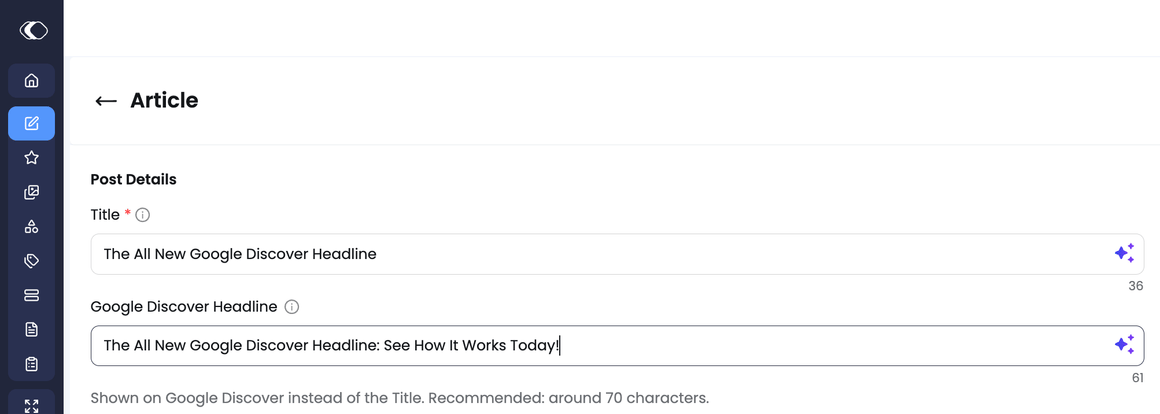
Enabling it
Google Discover Headline is opt-in — contact us to have it enabled for your account. There’s no setup required beyond that request.If you don’t request this, nothing changes in your dashboard. OG Title stays exactly where it is today, in SEO Properties, working exactly as it always has.
What changes
Once enabled, your existing OG Title value carries over into the new field automatically — nothing to re-enter. The OG Title input is then removed from the SEO Properties panel; every other field there (Meta Title, OG Description, Twitter Title) stays exactly as it was.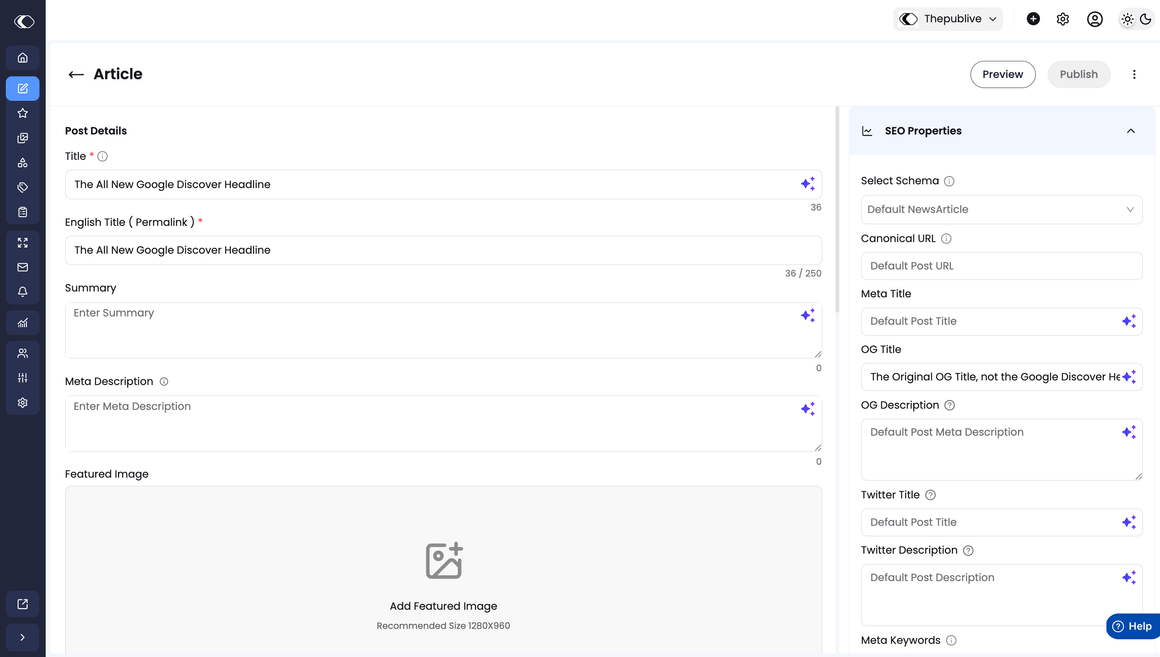
Why it matters
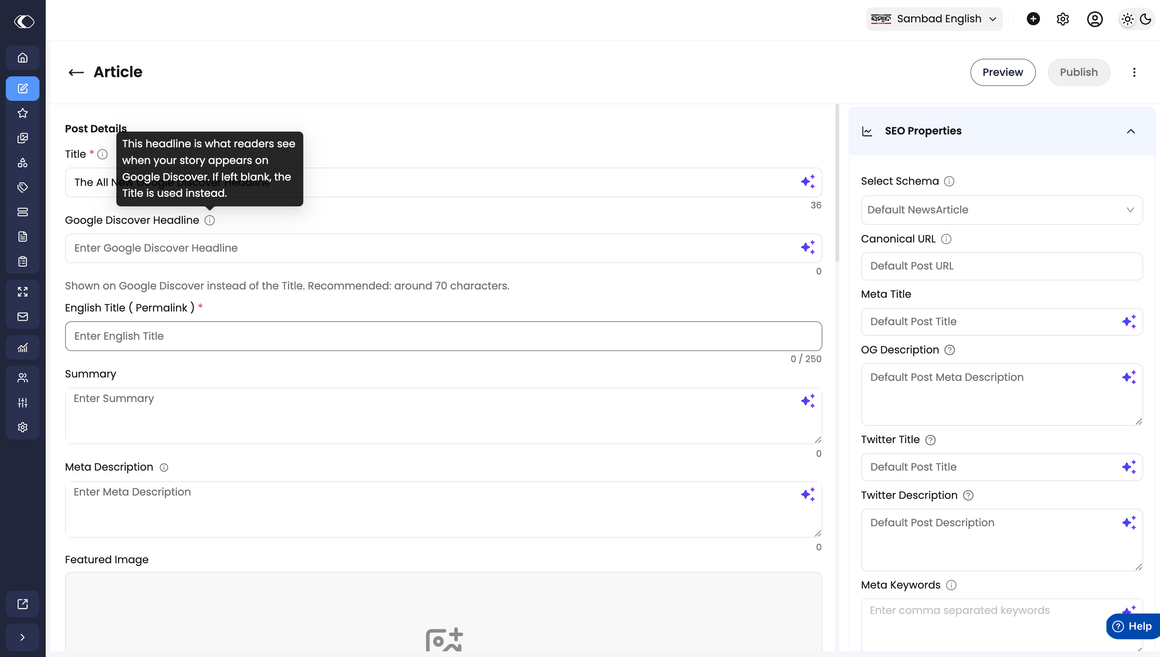
Google Discover Headline is the strongest signal you can give Google for the headline shown when your content appears in Google Discover — though not a guarantee of what displays, since Google’s own systems make the final call. It’s a distinct field from your page’s Title (H1) and your Meta Title, which serve separate jobs. Grouped inside SEO Properties alongside several similarly named fields, that distinction was easy to miss. Google’s own Discover documentation calls out compelling, non-misleading titles as a factor in whether content gets picked up by the feed, which is why this field now has a dedicated, visible spot next to Title. If left blank, Discover falls back to your page’s Title instead.Using the field
- Hover the ⓘ icon on either Title or Google Discover Headline for a quick explanation of how each is used.
- If left blank, Google Discover shows your Title instead.
- A live character counter shows as you type. We recommend keeping it under approximately 70 characters so it displays cleanly in Discover — there’s no hard limit, and longer headlines still save.
- The AI-generate (sparkle) icon next to the field works the same way it does on Title.
Scope
Google Discover Headline is available on every content type that previously supported OG Title, including Template Pages. It’s not available on Custom Content → Blank Page.FAQ
Will I lose my existing OG Title value if I enable this?
Will I lose my existing OG Title value if I enable this?
No. Once enabled, your existing OG Title value is carried over into the new Google Discover Headline field automatically — nothing to re-enter or re-save.
Does this affect my Meta Title, Twitter Title, or my page's H1?
Does this affect my Meta Title, Twitter Title, or my page's H1?
No, whether or not you enable this. Google Discover Headline only controls what was previously OG Title. Meta Title, Twitter Title, structured data, and your page’s H1 are all untouched.
Will Google always show exactly the headline I set here?
Will Google always show exactly the headline I set here?
Not necessarily, and that’s expected. Google Discover Headline is the signal you send to Google for the feed, but Google’s own systems make the final decision on what to display. A few ordinary reasons the two might not match:
- Indexing lag. Google has to recrawl your page before a headline change appears in Discover — this can take hours to days, not seconds.
- Google’s own choice. Discover can pull from the page Title, the on-page H1, or occasionally a headline it generates itself, if its systems judge that to be a better fit for the feed.
- Caching. What you see in your own Discover feed can be a cached, older version of the page.
Does this affect my live pages, SEO, or existing traffic?
Does this affect my live pages, SEO, or existing traffic?
No. The underlying value is unchanged and there’s no data migration, so nothing about how your live pages render or get indexed changes. This only affects where you find and edit the field in the editor.
I can't find OG Title in SEO Properties anymore — is it gone?
I can't find OG Title in SEO Properties anymore — is it gone?
OG Title only moves out of SEO Properties once Google Discover Headline is enabled for your account. If you haven’t requested it, OG Title is exactly where it’s always been.
Is there a recommended format for a Discover Headline, beyond the character count?
Is there a recommended format for a Discover Headline, beyond the character count?
No hard rule on length, structure, dates, or numbers — the character counter is a soft guide only, and longer headlines still save.The one steer worth keeping in mind: aim for curiosity and emotion over keyword-heavy phrasing. That’s what tends to perform better in Discover, versus the clearer, keyword-led style that works for Search. For general guidance on what Google rewards in Discover, see Google’s own Discover documentation.
If we enable this and later change our mind, can we turn it off?
If we enable this and later change our mind, can we turn it off?
Yes. Since enabling is opt-in, disabling works the same way — contact us and we’ll switch it off for you.Turning it off doesn’t touch your existing titles, OG data, or SEO setup. The field just moves back to its original spot in SEO Properties, exactly as it was before you enabled it.
Is there a report showing which of our posts have a Discover Headline set?
Is there a report showing which of our posts have a Discover Headline set?
Not as a self-serve report inside the dashboard today. We do track this on our side and can share the data with you on request — reach out to your account team if you’d like a look at your own adoption numbers.
Has this been tested on live content? Have you seen any impact on Discover performance or traffic?
Has this been tested on live content? Have you seen any impact on Discover performance or traffic?
The underlying field has existed as OG Title for a long time — this update gives it a dedicated, visible home in the editor rather than changing anything about how it works. We’re rolling this out to publishers in stages and watching results closely as we go; happy to share what we’re seeing as that data comes in.